

Have you ever noticed your Blogger homepage suddenly showing fewer posts than the number you actually set in your layout settings? I recently ran into this exact issue on my own blog.
My homepage was only displaying 5 posts even though I had already configured Blogger to show 6 posts on the main page. I even tried increasing the number to 8, 10, and 12, but the missing posts still would not appear.
After troubleshooting for a while, I finally discovered the reason behind the problem.
According to DarkUFO, Blogger sometimes struggles when loading extremely long posts directly on the homepage. Instead of loading only previews, Blogger attempts to load the full article content all at once, which may eventually cause a timeout issue.
In my case, the issue started happening after publishing a very long article. That particular post was always the one missing from the homepage list.
While it is surprising that this old Blogger issue still exists today, the good news is that there are simple workarounds that can fix it.
Using a Jump Break or Read More tag helps reduce the amount of content loaded on the homepage. Instead of loading the entire article, Blogger only displays the introduction and featured image, which keeps the homepage lighter and faster.
Solution #1: Add a Jump Break
Edit your long Blogger post and insert a page break or jump break where you want the article preview to end.
See the example below:

Solution #2: Use the "More" Tag Manually
You can also manually add the following code at the beginning of very large Blogger posts.
Switch the post editor into HTML mode, then paste this code near the top of the article:
<!-- more -->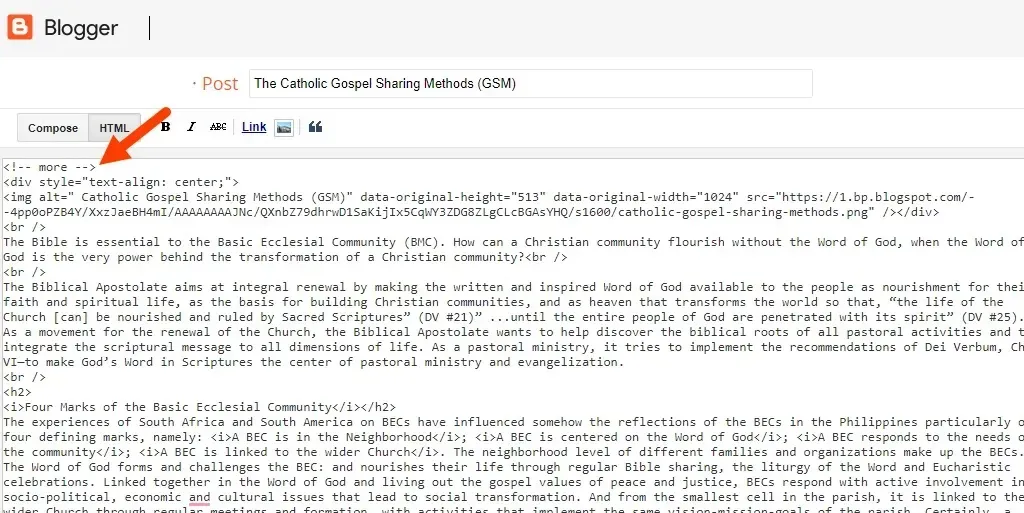
Using the <!-- more --> tag helps keep the homepage lightweight because Blogger only loads the preview section instead of the full article content.
This can improve loading speed and prevent homepage timeout issues caused by very long posts.
After applying these fixes to my own blog, the homepage finally started displaying all posts correctly again.
Final Thoughts
If your Blogger homepage is suddenly showing fewer posts than expected, large article content may be the cause.
Adding a jump break or manually inserting the <!-- more --> tag is one of the easiest ways to reduce homepage load size and prevent missing posts from happening.
Hopefully, this quick fix helps restore your Blogger homepage layout and keeps your site loading smoothly again.
- Hayes, B. Z. (2019, September 12). How to increase the number of posts showing up on the home page for the soho theme? - Blogger Community [Discussion Post]. Retrieved from https://support.google.com/blogger/thread/14139219?hl=en.
- Anuar, K. (2017, June 19). Blogger main page doesn't show more than 12 posts - Web Applications Stack Exchange [Discussion Post]. Retrieved from https://webapps.stackexchange.com/questions/104930/blogger-main-page-doesnt-show-more-than-12-posts.


)